mirror of
https://github.com/ikechan8370/chatgpt-plugin.git
synced 2025-12-16 13:27:08 +00:00

332 lines
14 KiB
Markdown
332 lines
14 KiB
Markdown

|
||
<div align=center> <h1>云崽系机器人的智能聊天插件</h1> </div>
|
||
<div align=center>
|
||
|
||
<img src ="https://img.shields.io/github/issues/ikechan8370/chatgpt-plugin?logo=github"/>
|
||
<img src ="https://img.shields.io/github/license/ikechan8370/chatgpt-plugin"/>
|
||
<img src ="https://img.shields.io/github/v/tag/ikechan8370/chatgpt-plugin?label=latest%20version&logo=github"/>
|
||
<img src ="https://img.shields.io/github/languages/top/ikechan8370/chatgpt-plugin?logo=github"/>
|
||
</div>
|
||
|
||
|
||
|
||

|
||
|
||
|
||
|
||
|
||
|
||
### 推荐的相关文档和参考资料
|
||
本README
|
||
[手册](https://yunzai.chat)
|
||
[文档1(建设中)](https://chatgpt-docs.err0r.top/)
|
||
[插件常见问题(鹤望兰版)](https://chatgptplugin.ikechan8370.com/guide/)
|
||
[Yunzai常见问题(LUCK小运版)](https://www.wolai.com/oA43vuW71aBnv7UsEysn4T)
|
||
[憨憨博客](https://blog.hanhanz.top/)
|
||
|
||
## 特点
|
||
|
||
* 支持单人连续对话Conversation
|
||
* API模式下,使用 gpt-3.5-turbo 或 gpt-4 API,仅需OpenAI Api Key,开箱即用。**注意收费**
|
||
* 支持问答图片截图和聊天记录导出
|
||
* 支持AI性格调教,角色扮演强烈推荐Bing自定义模式
|
||
* 支持对接vits和Azure等回答直接转语音
|
||
* API3模式下,绕过Cloudflare防护直接访问ChatGPT的SSE API,与官方体验一致,且保留对话记录,在官网可查。免费。
|
||
* (已不再维护)提供基于浏览器的解决方案作为备选,API3不可用的情况下或担心账户安全的用户可以选择使用浏览器模式。
|
||
* 支持新[必应](https://www.bing.com/new)(token负载均衡,限流降级)
|
||
* 2023-03-15 API3支持GPT-4尝鲜,需要Plus用户(疑似被官方阻断暂不支持api3的gpt4)
|
||
* 支持[ChatGLM](https://github.com/THUDM/ChatGLM-6B)模型。基于[自建API](https://github.com/ikechan8370/SimpleChatGLM6BAPI)
|
||
* 2023-04-15 支持[Claude by Slack](https://www.anthropic.com/claude-in-slack )和Poe(WIP)。Claude配置参考[这里](https://ikechan8370.com/archives/chatgpt-plugin-for-yunzaipei-zhi-slack-claude)
|
||
* 2023-05-12 支持星火大模型
|
||
* 2023-05-29 支持gpt-4 API.必应无需cookie即可对话(Sydney和自定义模式)
|
||
* 2023-07 支持智能模式,机器人可以实现禁言、群名片/头衔(需给机器人管理员/群主)、分享音乐视频、主动发音频、对接ap,sr和喵喵等插件、联网搜索等,需api模式0613系列模型。智能模式所需的额外api和搜索api分别可以参考[chatgpt-plugin-extras](https://github.com/ikechan8370/chatgpt-plugin-extras) 和 [search-api](https://github.com/ikechan8370/search-api) 自行搭建,其中后者提供了一个公益版本,前者可使用[huggingface](https://huggingface.co/spaces/ikechan8370/cp-extra)部署
|
||
* 2023-09-10 支持来自claude.ai的claude-2模型
|
||
* 2023-10-19 支持读取文件,(目前适配必应模式和Claude2模式)
|
||
* 2023-10-25 增加支持通义千问官方API
|
||
### 如果觉得这个插件有趣或者对你有帮助,请点一个star吧!
|
||
|
||
## 版本要求
|
||
Node.js >= 18 / Node.js >= 14(with node-fetch)
|
||
小白尽可能使用18版本以上的nodejs
|
||
|
||
## 安装与使用方法
|
||
|
||
### 安装
|
||
1. 进入 Yunzai根目录
|
||
|
||
2. 请将 chatgpt-plugin 放置在 Yunzai-Bot 的 plugins 目录下
|
||
|
||
推荐使用 git 进行安装,以方便后续升级。在 Yunzai-Bot 根目录夹打开终端,运行下述指令进行安装
|
||
|
||
```shell
|
||
# github源
|
||
git clone --depth=1 https://github.com/ikechan8370/chatgpt-plugin.git ./plugins/chatgpt-plugin/
|
||
|
||
# 网络不好连不上github可以使用gitee源,但更新可能不如github及时
|
||
git clone --depth=1 https://gitee.com/ikechan/chatgpt-plugin.git ./plugins/chatgpt-plugin/
|
||
|
||
# 以上二选一后执行下面步骤进入目录安装依赖
|
||
cd plugins/chatgpt-plugin
|
||
pnpm i
|
||
|
||
```
|
||
|
||
如果是手工下载的 zip 压缩包,请将解压后的 chatgpt-plugin 文件夹(请删除压缩自带的-master或版本号后缀)放置在 Yunzai-Bot 目录下的 plugins 文件夹内
|
||
|
||
3. 修改配置
|
||
**本插件配置项比较多,强烈建议使用后台工具箱或[锅巴面板](https://github.com/guoba-yunzai/Guoba-Plugin)修改**
|
||
|
||
或者创建和编辑config/config.json文件。
|
||
|
||
4. 后台面板使用
|
||
初次使用请先私聊机器人 `#设置管理密码` 进登录密码设置
|
||
私聊 `#chatgpt系统管理` 后机器人会回复系统管理页面网址,在此网址输入机器人QQ号和刚刚设置的管理密码点击登录即可进入后台管理系统
|
||
如果忘记密码,再次私聊输入 `#设置管理密码` 后可重新设置密码
|
||
|
||
用户同样可私聊机器人 `#设置用户密码` 进行账号注册和密码设置
|
||
用户设置密码后,所有聊天信息将记录在用户缓存数据下,同时用户可通过私聊机器人 `#chatgpt用户配置` 登录后台用户配置面板,查看自己的聊天数据和自定义机器人对自己的回复参数
|
||
|
||
如果后台面板访问出现 time out 请检查机器人启动时是否有报错,服务器端口是否开放,可尝试ping一下服务器ip看能否直接ping通。
|
||
|
||
5. 重启Yunzai-Bot
|
||
如通过后台面板或锅巴面板升级可以热加载,无需重启。
|
||
|
||
---
|
||
|
||
### 相关配置
|
||
|
||
#### 配置文件相关
|
||
|
||
配置文件位置:`plugins/chatgpt-plugin/config/config.json`
|
||
|
||
部分关键配置项,其他请参照文件内注释:
|
||
|
||
| 名称 | 含义 | 解释 |
|
||
|:-----------------:| :-----------------: |:-------------------------------------------------:|
|
||
| proxy | 代理地址 | 请在此处配置你的代理,例如`http://127.0.0.1:7890` |
|
||
| apiKey | openai账号的API Key | 获取地址:https://platform.openai.com/account/api-keys |
|
||
|
||
#### Token相关
|
||
|
||
与Token相关的设置需在qq与机器人对话设置,设置后方可使用对应的api
|
||
|
||
| 名称 | 含义 | 解释 | 设置方式 |
|
||
| :-----------------: | :------------------: | :----------------------------------------------------------: |:--------------------------------------------------------:|
|
||
| ChatGPT AccessToken | ChatGPT登录后的Token | 具体解释见下方 | \#chatgpt设置token |
|
||
| 必应token | 必应登录后的Token | 必应(Bing)将调用微软必应AI接口进行对话。不填写token对话上限为5句,填写后为20句。无论填写与否插件都会无限续杯。 | \#chatgpt设置必应token/\#chatgpt删除必应token/\#chatgpt查看必应token |
|
||
|
||
|
||
> #### 我没有注册openai账号?如何获取
|
||
>
|
||
> 您可以按照以下方法获取openai账号
|
||
>
|
||
> 进入https://chat.openai.com/ ,选择signup注册。目前openai不对包括俄罗斯、乌克兰、伊朗、中国等国家和地区提供服务,所以自行寻找办法使用**其他国家和地区**的ip登录。此外,注册可能需要验证所在国家和地区的手机号码,如果没有国外手机号可以试试解码网站,收费的推荐https://sms-activate.org/
|
||
>
|
||
> #### 我有openai账号了,如何获取API key和Access Token?
|
||
>
|
||
> - 获取API key
|
||
> - 进入账户后台创建API key(Create new secret key):https://platform.openai.com/account/api-keys
|
||
>
|
||
> - 获取Access Token
|
||
> - **登录后**访问https://chat.openai.com/api/auth/session
|
||
> - 您会获得类似如下一串json字符串`{"user":{"id":"AAA","name":"BBB","email":"CCC","image":"DDD","picture":"EEE","groups":[]},"expires":"FFF","accessToken":"XXX"}`
|
||
> - 其中的XXX即为`ChatGPT AccessToken`
|
||
> - 如果是空的{},说明没有登录,要登录chatgpt而不是openai。
|
||
>
|
||
> #### ChatGPT AccessToken 设置了有什么用?我为什么用不了API模式
|
||
>
|
||
> - 部分API需要在和机器人的聊天里输入`#chatgpt设置token`才可以使用
|
||
>
|
||
> #### 我有新必应的测试资格了,如何获取必应Token?
|
||
> 2023/05/29 无需登录也可以使用了,要求不高可以不填
|
||
>
|
||
> 1. JS一键获取
|
||
>
|
||
> 登录www.bing.com,刷新一下网页,按F12或直接打开开发者模式,点击Console/控制台,运行如下代码,执行后即在您的剪切板存储了必应Token
|
||
>
|
||
> ```js
|
||
> copy(document.cookie.split(";").find(cookie=>cookie.trim().startsWith("_U=")).split("=")[1]);
|
||
> ```
|
||
>
|
||
> 2. 手动获取
|
||
>
|
||
> 登录www.bing.com,刷新一下网页,按F12或直接打开开发者模式,点击Application/存储,点击左侧Storage下的Cookies,展开找到[https://www.bing.com](https://www.bing.com/) 项,在右侧列表Name项下找到"\_U",_U的value即为必应Token
|
||
>
|
||
>
|
||
>
|
||
> 其他问题可以参考使用的api库 https://github.com/transitive-bullshit/chatgpt-api 以及 https://github.com/waylaidwanderer/node-chatgpt-api
|
||
|
||
|
||
### 使用方法
|
||
|
||
根据配置文件中的toggleMode决定联通方式。
|
||
|
||
- at模式:@机器人 发送聊内容即可
|
||
|
||
- prefix模式:【#chat+问题】,本模式可以避免指令冲突。
|
||
|
||
发挥你的想象力吧,~~调教~~拟造出你自己的机器人风格!
|
||
|
||
|
||
#### 文本/图片回复模式
|
||
|
||
> #chatgpt文本/图片/语音模式
|
||
|
||
可以控制机器人回复的方式
|
||
|
||
#### 对话相关
|
||
|
||
> #chatgpt对话列表
|
||
>
|
||
> #结束对话 [@某人]
|
||
>
|
||
> #清空chat队列
|
||
>
|
||
> #移出chat队列首位
|
||
>
|
||
> #chatgpt开启/关闭问题确认
|
||
>
|
||
> ...
|
||
|
||
#### 设置相关
|
||
|
||
> #chatgpt切换浏览器/API/API2/API3/Bing
|
||
>
|
||
> #chatgpt设置[必应]Token
|
||
>
|
||
> ...
|
||
|
||
#### 获取帮助
|
||
|
||
> #chatgpt帮助
|
||
>
|
||
> #chatgpt模式帮助
|
||
|
||
发送#chatgpt帮助,有更多选项可以配置
|
||
|
||
### 如何更新
|
||
|
||
发送#chatgpt更新指令。如果有冲突,可以使用#chatgpt强制更新。
|
||
|
||
## 示例与截图
|
||
|
||
- 程序员版
|
||
|
||

|
||
|
||
- 傲娇版
|
||
|
||

|
||

|
||
|
||
## TODO
|
||
|
||
* V3重构
|
||
* 插件in插件
|
||
* langchain分支完善
|
||
* 游戏机制
|
||
|
||
## 其他
|
||
|
||
### 常见问题
|
||
|
||
1. 如果在linux系统上发现图片模式下emoj无法正常显示,可以搜索安装支持emoj的字体,如Ubuntu可以使用`sudo apt install fonts-noto-color-emoji`
|
||
|
||
2. 我和机器人聊天但没有任何反应怎么办?
|
||
|
||
可能是由于Yunzai-bot异常退出等原因造成Redis 队列中有残留的等待问题。使用`#清空队列`命令清除队列后再试。
|
||
|
||
3. Error [ERR_MODULE_NOT_FOUND]: Cannot find package 'xxx'.
|
||
|
||
请参照本文档前面的安装依赖部分重新依赖。随着项目更新可能引入新的依赖。
|
||
|
||
> 一般情况下请按照 [安装](#安装) 小节的内容重新安装依赖即可
|
||
>
|
||
>
|
||
>
|
||
> 最多的问题:载入插件错误:chat
|
||
>
|
||
> 问题详情:Error [ERR_MODULE_NOT_FOUND]: Cannot find package 'showdown' imported from /app/Yunzai-Bot/plugins/chatgpt-plugin/apps/chat.js
|
||
>
|
||
> 原因:没装依赖
|
||
>
|
||
> 解决方式:请参考文档在本插件目录下用`pnpm install`安装依赖,安装完就不报错了
|
||
|
||
4. 反代能自己搭吗?
|
||
|
||
能。参考[这里](https://ikechan8370.com/archives/da-jian-chatgpt-guan-fang-fan-xiang-dai-li)
|
||
|
||
必应可以用[azure](https://ikechan8370.com/archives/ji-yu-azure-container-web-applicationda-jian-mian-fei-bi-ying-fan-dai)或~cloudflare workers~的serverless服务:
|
||
|
||
(202307 Cloudflare亡了!)
|
||
|
||
6. vit API能本地搭建吗?
|
||
|
||
能。克隆下来安装依赖直接运行即可。
|
||
|
||
7. 系统后台无法进入怎么办?
|
||
|
||
多数情况下是由于服务器未开放3321端口导致,请根据服务器系统和服务器供应商配置,开放3321端口后再试。
|
||
|
||
## 交流群
|
||
|
||
* QQ 559567232 [问题交流]
|
||
* QQ 126132049 [机器人试验场]
|
||
|
||
## 感谢
|
||
|
||
本项目使用或参考了以下开源项目
|
||
* https://github.com/transitive-bullshit/chatgpt-api
|
||
* https://github.com/waylaidwanderer/node-chatgpt-api
|
||
* https://github.com/acheong08/ChatGPT
|
||
* https://github.com/PawanOsman
|
||
|
||
本插件的辅助项目
|
||
* https://github.com/ikechan8370/node-chatgpt-proxy
|
||
* https://github.com/ikechan8370/SimpleChatGLM6BAPI
|
||
|
||
图片以及Bing模式支持 @HalcyonAlcedo
|
||
* https://github.com/HalcyonAlcedo/ChatGPT-Plugin-PageCache
|
||
* https://github.com/HalcyonAlcedo/cache-web
|
||
|
||
语音vits模型来自于
|
||
* https://huggingface.co/spaces/sayashi/vits-uma-genshin-honkai
|
||
|
||
以及ChatGPT及OpenAI
|
||
* https://chat.openai.com/
|
||
* https://platform.openai.com/
|
||
|
||
ChatGLM
|
||
* https://huggingface.co/THUDM/chatglm-6b
|
||
* https://github.com/THUDM/ChatGLM-6B
|
||
|
||
## 赞助
|
||
|
||
如果觉得本项目好玩或者对你有帮助,愿意的话可以赞助我一口快乐水:
|
||
|
||
https://afdian.net/a/ikechan8370
|
||
|
||
## 贡献者
|
||
|
||
感谢以下贡献者
|
||
|
||
<a href="https://github.com/ikechan8370/chatgpt-plugin/graphs/contributors">
|
||
<img src="https://contrib.rocks/image?repo=ikechan8370/chatgpt-plugin" />
|
||
</a>
|
||
|
||
|
||
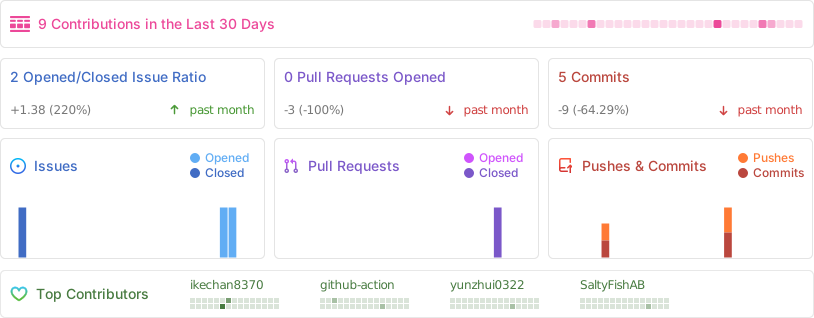
|
||
|
||
## Star History
|
||
|
||
[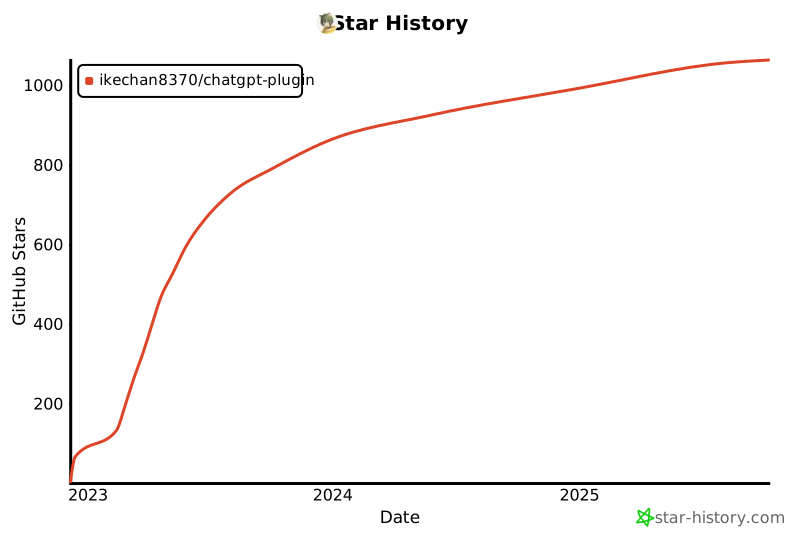](https://star-history.com/#ikechan8370/chatgpt-plugin&Date)
|
||
|
||
## 工具支持
|
||
<a href="https://jb.gg/OpenSourceSupport" >
|
||
<img style="width: 300px" src="https://resources.jetbrains.com/storage/products/company/brand/logos/jb_beam.png"/>
|
||
</a>
|
||
|
||
JetBrains for Open Source development license
|
||
|
||
|
||
|